API
Read your Pulse Analytics data programmatically with an API key.
Pulse has a read API for pulling your analytics into a dashboard, a data warehouse, or a scheduled report. It is available on every plan — the difference between plans is how much you can pull, not what you can reach. If you just want numbers in a terminal or a shell script without writing HTTP calls, see the CLI — it's a thin client over this same API.
The API returns counts. There is no endpoint that returns individual visitors or sessions, and there never will be — see What the API will never return.
Creating a key
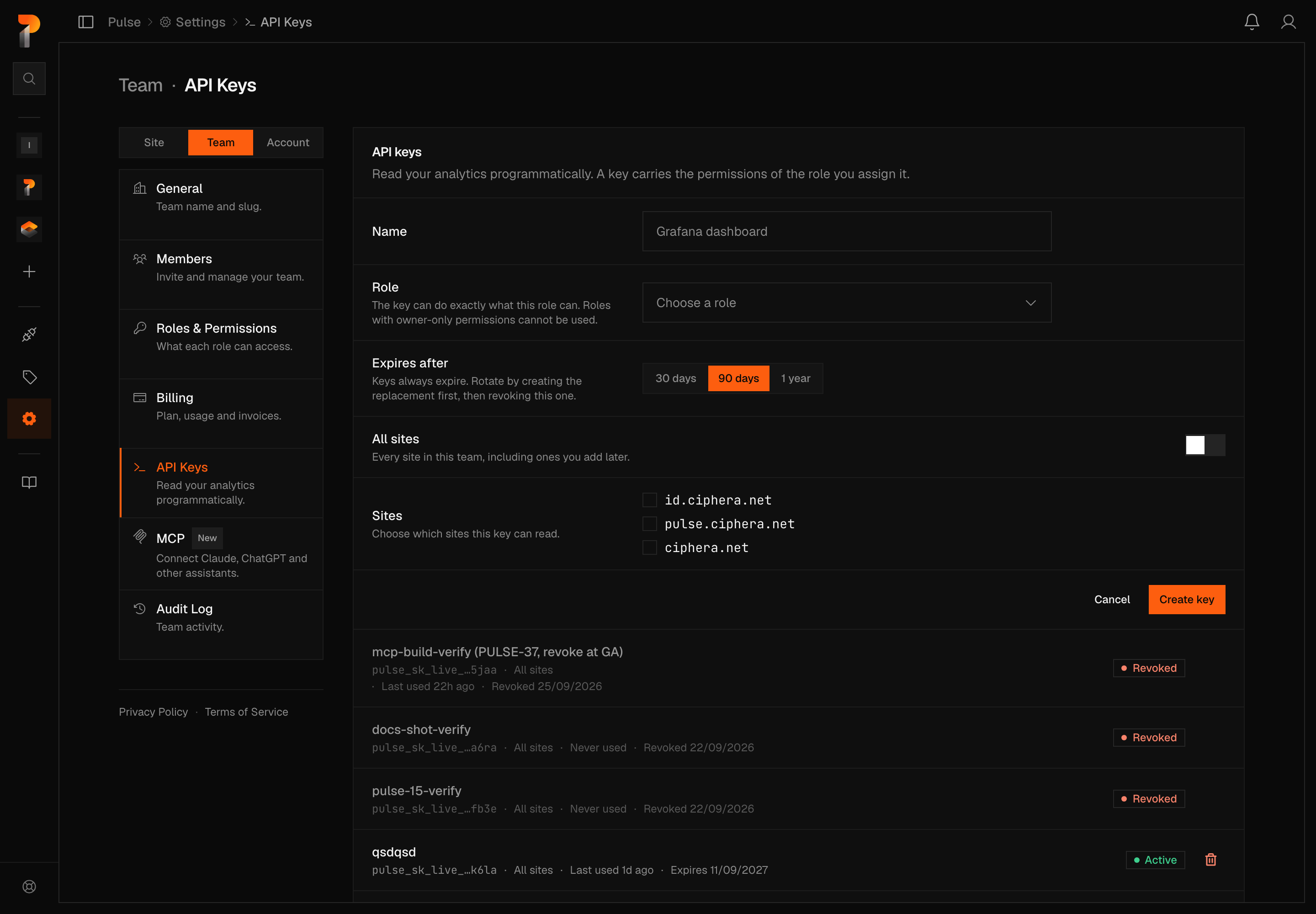
Go to Settings → Team → API Keys (Settings → Account → API Keys if you work alone) and click New key. You will be asked for:
- Name — so you can recognise it later (
Grafana,warehouse sync) - Role — the key can do exactly what this role can. Roles carrying owner-only permissions cannot be attached to a key.
- Expires after — 30 days, 90 days, or 1 year. There is no "never expires" option.
- Which sites it can read — a checkbox grants every site in the team, or leave it unchecked and pick specific ones below it
Warning
The key is shown once, when you create it. Pulse stores only a hash of it, so we cannot show it to you again or recover it if it is lost. Copy it straight into your secret manager.
Keys look like this:
pulse_sk_live_udo4raikcyn7fnmlkm6k642rma_rklj2fAuthenticating
Send the key as a bearer token:
curl -H "Authorization: Bearer pulse_sk_live_..." \
  "https://pulse-api.ciphera.net/api/public/v1/sites/SITE_ID/export/daily?from=2026-08-01&to=2026-08-07"
Warning
Keys are server-side only. Requests carrying a browser Origin header are rejected, and the API sends no CORS headers, so a key cannot be used from browser JavaScript. If you want visitor numbers on a public page, use a shared dashboard instead — a key in frontend code is a key you have published.
Passing the key in the URL (?api_key=...) is rejected with a 400. Keys in query strings leak into browser history, Referer headers and proxy logs.
Response shape
Every endpoint except the two CSV exports returns the same envelope:
{
  "data": { },
  "meta": { "suppressed": false }
}
data is the answer. meta describes the answer: the date range the server actually queried, and suppressed, which is always false (see Withheld numbers). It is always present, so you never need to check for it before reading it.
The two export/* endpoints predate this envelope and still return CSV, or a bare array with format=json. Those column and field names are stable and will stay that way — where an export needs to tell you something about the response rather than in it, it uses headers.
Endpoints
| Endpoint | Returns |
|---|---|
GET /me | What this key is and when it expires |
GET /sites | The sites this key can read |
GET /sites/{id}/stats | Totals over a date range, filterable |
GET /sites/{id}/breakdown | Traffic ranked by one dimension — pages, referrers, countries, and more |
GET /sites/{id}/realtime | Who is on the site right now |
GET /sites/{id}/export/daily | One row per day, as CSV |
GET /sites/{id}/export/pages | Top pages, as CSV |
Your key
GET /api/public/v1/meValidates the key and describes it. Use it to check a key works before relying on it, and to find out why one stopped — every authentication failure returns the same 401 on purpose, so a successful /me is the only thing that can tell you an expiry date.
curl -H "Authorization: Bearer $PULSE_API_KEY" \
  "https://pulse-api.ciphera.net/api/public/v1/me"
{
"data": {
"organization": { "id": "2c1f74ec-...", "name": null },
"key": {
"name": "Grafana dashboard",
"last4": "chju",
"expires_at": "2026-11-05T00:00:00Z",
"scope_all_sites": true,
"site_ids": [],
"last_used_at": "2026-08-07T09:12:44Z"
}
},
"meta": { "suppressed": false }
}last_used_at is null for a key that has never been used, and otherwise reports the previous request — not the one you just made.
Sites
GET /api/public/v1/sitesThe sites this key can read. A key scoped to specific sites sees only those.
{
  "data": [
    {
      "id": "e6a95eb8-8edb-44d4-a4e2-c400aea174a4",
      "slug": "ciphera",
      "domain": "ciphera.net",
      "name": "Ciphera",
      "timezone": "Europe/Brussels",
      "last_event_at": "2026-08-07T09:14:02Z",
      "created_at": "2026-02-11T18:31:00Z"
    }
  ],
  "meta": { "suppressed": false }
}
last_event_at is null if the site has never received an event — which is the quickest way to tell a quiet site from a broken install.
Paths take the id, not the slug. A slug is yours to rename, and a URL that stops working because someone tidied a name is a URL we should not have asked you to store.
Stats
GET /api/public/v1/sites/{site_id}/statsTotals over a date range. Ask for a range with either period or from/to — sending both is a 400 rather than a guess.
| Parameter | Values |
|---|---|
period | 7d, 30d, month, year. Default 7d. |
from, to | YYYY-MM-DD, inclusive, max 366 days apart |
filter | See Filtering. Repeatable. |
curl -H "Authorization: Bearer $PULSE_API_KEY" \
  "https://pulse-api.ciphera.net/api/public/v1/sites/$SITE/stats?period=7d"
{
"data": {
"visitors": 1284,
"pageviews": 3401,
"bounce_rate": 62.4,
"avg_duration": 107.2,
"avg_scroll_depth": 51.8,
"avg_visible_duration": 44.1
},
"meta": {
"range": { "from": "2026-08-01", "to": "2026-08-07", "timezone": "Europe/Brussels", "period": "7d" },
"suppressed": false
}
}avg_duration and avg_visible_duration above are computed the same way as in the daily export — see the note there if your range crosses 04-09-2026.
period is resolved on our side, in the site's timezone, and the dates come back in meta.range. That matters more than it looks: if your script worked out "the last 7 days" itself it would use its timezone, and your numbers would quietly stop matching your dashboard. Read meta.range and you always know which days you got.
Breakdown
GET /api/public/v1/sites/{site_id}/breakdownRanks a site's traffic by one dimension over a date range — the numbers behind a dashboard panel, as a flat list. Ask for a range with either period or from/to, same as Stats.
| Parameter | Values |
|---|---|
dimension | Required. One of the fourteen below. |
period | 7d, 30d, month, year. Default 7d. |
from, to | YYYY-MM-DD, inclusive, max 366 days apart |
filter | See Filtering. Repeatable, up to two dimensions. |
limit | Default 20, max 100. |
dimension is one of page, entry_page, exit_page, referrer, channel, country, region, browser, os, device, language, utm_source, utm_medium, utm_campaign. A handful are worth a line:
entry_page/exit_page— the page a visit started, or ended, on. Not every page that visit went on to view.channel— the traffic-source class your dashboard's Channels panel groups by (Direct, Search, Social, and so on), not a raw referrer.region— each row also carries acountry, because a region name alone is ambiguous: "Limburg" is a province of both Belgium and the Netherlands.utm_source,utm_medium,utm_campaign— count only traffic tagged with that parameter. Untagged traffic is left out of the rows, not listed as "Unknown".
city, timezone, screen_resolution, utm_term and utm_content can be used to filter a breakdown but not to group by — they're too fine-grained, or too often free text, to publish as a ranked list. Asking for one of them as dimension returns 400.
curl -H "Authorization: Bearer $PULSE_API_KEY" \
  "https://pulse-api.ciphera.net/api/public/v1/sites/$SITE/breakdown?dimension=referrer&period=30d&filter=country==BE"
{
"data": {
"dimension": "referrer",
"rows": [
{ "value": "google.com", "visitors": 412, "pageviews": 588 },
{ "value": "twitter.com", "visitors": 37, "pageviews": 41 },
{ "value": "(direct)", "visitors": 29, "pageviews": 33 }
]
},
"meta": {
"range": { "from": "2026-07-09", "to": "2026-08-07", "timezone": "Europe/Brussels", "period": "30d" },
"suppressed": false
}
}rows is never null — a range with no traffic returns []. Rows are ranked largest first: by pageviews for page, entry_page and exit_page, by visitors for everything else, matching the order of the equivalent dashboard panel.
pageviews on a row means different things by dimension. For page it's pageviews on that path. For entry_page and exit_page it's the number of visits that started, or ended, there — one entry (or exit) pageview per visit. For the three utm_* dimensions it's every event that carried the tag, the same population your dashboard's campaign table counts.
Every row comes back with its real counts, filtered or not, including a page path with exactly one visitor. meta.suppressed is always false, as it is on every endpoint.
Realtime
GET /api/public/v1/sites/{site_id}/realtimeSessions active in the last five minutes, and the pages they are on. Takes an optional limit (default 20, max 100).
{
  "data": {
    "visitors": 27,
    "top_paths": [
      { "path": "/", "visitors": 14 },
      { "path": "/pricing", "visitors": 6 }
    ]
  },
  "meta": { "suppressed": false }
}
Realtime accepts no filters, and never will. A filtered five-minute window stops describing a population and starts describing a person.
Every page in the window is listed with its count, however small, up to limit.
Note that top_paths will not sum to visitors: someone who reads two pages in five minutes is counted on both.
Daily metrics
GET /api/public/v1/sites/{site_id}/export/dailyBoth export endpoints require from and to (YYYY-MM-DD, inclusive) and take an optional format of csv (default) or json. They return raw CSV, not the envelope.
Returns one row per day: date, pageviews, visitors, bounce_rate, avg_duration, avg_scroll_depth, avg_visible_duration.
Warning
avg_duration and avg_visible_duration changed meaning on 04-09-2026 — same
fields, same types, corrected measurement. Before that date they were derived from
wall-clock time since page load, so a tab left open counted; from it they measure the
time a page was visible and in use. Rows dated before the boundary are bounded
estimates capped at 30 minutes per page, not measurements, so a range that spans
04-09-2026 mixes two instruments. Expect values to step down. No field was added,
removed or retyped, so the additive-only contract holds.
curl -H "Authorization: Bearer $PULSE_API_KEY" \
"https://pulse-api.ciphera.net/api/public/v1/sites/$SITE/export/daily?from=2026-08-01&to=2026-08-07"date,pageviews,visitors,bounce_rate,avg_duration,avg_scroll_depth,avg_visible_duration
2026-08-01,10,9,88.9,115.3,43.0,23.5
2026-08-02,11,9,77.8,83.5,64.1,29.6Every day carries its four per-session metrics, however few visitors it had. Each daily export also carries two headers from when small days were withheld. They stay so that clients built against them keep working, and both are always 0:
X-Pulse-Min-Cell-Size: 0
X-Pulse-Suppressed-Day-Metrics: 0
An empty cell (JSON null) is a rate Pulse did not measure, such as on a day imported from another analytics tool. It does not mean zero.
Top pages
GET /api/public/v1/sites/{site_id}/export/pagesReturns path and pageviews. Also accepts limit (default 100, max 1000) and filters.
Every row is listed, filtered or not, however few visitors it had. A filtered export also carries three headers from when small rows were withheld. They stay so that clients built against them keep working, and all three are always 0:
X-Pulse-Min-Cell-Size: 0
X-Pulse-Suppressed-Rows: 0
X-Pulse-Suppressed-Pageviews: 0
curl -H "Authorization: Bearer $PULSE_API_KEY" \
"https://pulse-api.ciphera.net/api/public/v1/sites/$SITE/export/pages?from=2026-08-01&to=2026-08-07&limit=20"path,pageviews
/,48
/blog/open-source-privacy-tools-2026,8
/about,4Filtering
/stats, /breakdown and export/pages accept filters. Repeat the parameter — one filter per filter=:
curl -H "Authorization: Bearer $PULSE_API_KEY" \
  "https://pulse-api.ciphera.net/api/public/v1/sites/$SITE/stats?period=30d&filter=country==BE&filter=browser!=Firefox"
== matches, != excludes. Repeating one dimension widens it — filter=country==BE&filter=country==NL means either. Different dimensions narrow — the example above is Belgian visitors who were not on Firefox.
Repeating the parameter, rather than joining filters with commas, is deliberate: page paths and referrers contain commas all the time, and a joined list would need you to escape them.
Warning
An earlier build of export/pages accepted a filters=v2:... parameter. That was our dashboard's internal format, and on an API key it allowed combinations narrow enough to describe one person. It now returns 400 (legacy_filter_syntax); use filter= as above. Breakdown rejects a bare filters= the same way.
Filterable dimensions: page, referrer, channel, country, region, city, browser, os, device, screen_resolution, language, timezone, utm_source, utm_medium, utm_campaign, utm_term, utm_content.
Warning
A key may combine at most two dimensions in one query. A third returns 400. The dashboard lets you combine all seventeen, because that is your own staff reading your own screen; an API key is an export channel, and each dimension you add narrows the answer closer to one person.
Withheld numbers
Nothing is withheld. Every endpoint returns real numbers at any size, filtered or not, including a slice of one visitor. meta.suppressed is always false, and min_cell_size is not sent.
Until 21 October 2026, a filtered Stats total covering fewer than five visitors came back as null with suppressed: true, Realtime left out pages with fewer than five current visitors, and the two exports (Daily metrics, Top pages) withheld a small day's rates and a small filtered row. The fields and headers that reported this are still part of every response, so a client built against them keeps working: suppressed is false, suppressed_rows and suppressed_total are absent, and the export headers are 0.
A worked example
Pulling a week of metrics into a file, in Python:
import os, csv, io, requests

KEY  = os.environ["PULSE_API_KEY"]
SITE = os.environ["PULSE_SITE_ID"]

r = requests.get(
    f"https://pulse-api.ciphera.net/api/public/v1/sites/{SITE}/export/daily",
    headers={"Authorization": f"Bearer {KEY}"},
    params={"from": "2026-08-01", "to": "2026-08-07", "format": "json"},
    timeout=30,
)
r.raise_for_status()

for day in r.json():
    print(day["date"], day["pageviews"], day["visitors"])
Limits
Requests are priced in units rather than counted, because one call asking for a year is not the same load as one asking for yesterday:
cost = ceil(days / 7) × (1 + dimensions) × shape_weight × (filtered ? 5 : 1)shape_weight is 1 for /me, /sites, /stats and /realtime, 3 for /breakdown, and 20 for the two exports. The dimension you break down by is the shape, not one of the dimensions a filter adds. In practice:
| Call | Units |
|---|---|
/me, /sites, /realtime | 1 |
/stats?period=7d | 1 |
/stats?period=30d | 5 |
/stats?period=year | 53 |
/stats?period=7d with one filter | 10 |
/breakdown?period=7d | 3 |
/breakdown?period=30d | 15 |
/breakdown?period=30d with one filter | 150 |
/breakdown?period=30d with two filter dimensions | 225 |
| A one-week export | 20 |
| A full-year export | 980 |
A request is priced before it runs, from its parameters. A request we cannot price — a malformed date, an unknown period — is charged as if it asked for the maximum, so that getting it wrong is never the cheap way to ask.
| Plan | Units per month | Max keys |
|---|---|---|
| Personal | 10,000 | 1 |
| Business | 500,000 | 5 |
Warning
A single key can never spend more than half of the monthly budget, so one leaked key can't burn through the whole allowance before it's noticed. On Personal, which allows only one key, that caps real usage at 5,000 of the 10,000 units above — there's no second key to spend the rest through.
Every plan also has a burst ceiling of 60 units per second.
Every response carries your current budget:
X-RateLimit-Limit: 250000
X-RateLimit-Remaining: 249940
X-RateLimit-Reset: 1788220799
Exceeding a limit returns 429 with a Retry-After header. The monthly budget resets on the 1st.
To put that in perspective: a Grafana panel polling one week of data every 60 minutes costs about 15,000 units a month.
Errors
Every error uses the same shape:
{
  "error": {
    "type": "invalid_request",
    "code": "invalid_date_range",
    "message": "date range cannot exceed 366 days"
  }
}| Status | Meaning |
|---|---|
400 | Something about the request is wrong — missing from/to, from after to, a range over 366 days, an unknown format, or a key sent in the URL |
401 | Missing, malformed, unknown, revoked or expired key. All five return the same response on purpose. |
404 | No such site, or this key is not scoped to it. Also deliberately the same response — the API does not confirm whether a site you cannot read exists. |
429 | Rate limited. Check Retry-After. |
503 | The API is busy, or realtime data is momentarily unavailable. Retry. |
Common code values on a 400:
code | Meaning |
|---|---|
conflicting_range | Both period and from/to were sent |
unknown_period | period was not one of 7d, 30d, month, year |
invalid_date_range | Missing, malformed, inverted, or over 366 days |
unknown_filter_dimension | Not a filterable dimension |
too_many_filter_dimensions | More than two dimensions combined |
filters_not_supported_on_realtime | filter sent to /realtime |
legacy_filter_syntax | filters= sent to /breakdown or export/pages — use repeated filter= instead |
missing_dimension | /breakdown called with no dimension |
unknown_dimension | /breakdown's dimension isn't one of the fourteen groupable ones |
invalid_limit | /breakdown's limit isn't a whole number from 1 to 100 |
browser_origin_not_supported | The request carried an Origin header |
credential_in_query_string | The key was in the URL rather than the header |
Rotating and revoking
Revoking takes effect immediately — anything using that key starts failing at once.
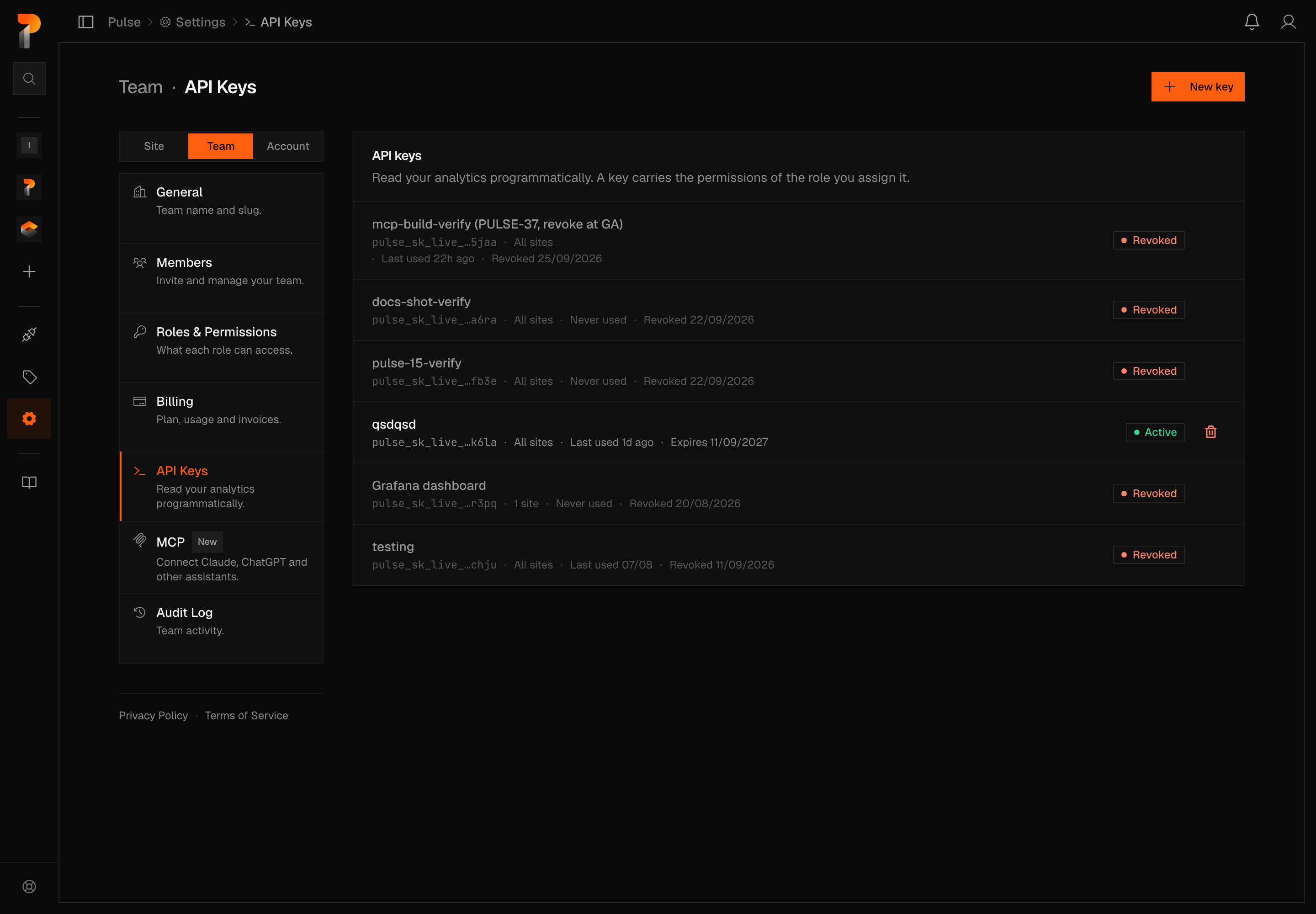
To rotate without downtime, create the replacement first, deploy it, then revoke the old key. The key list shows last used for each key, so a key that has never been used is safe to delete.
Pulse support will never ask you for a key. If you think one has leaked, revoke it — the fastest containment is that it stops working.
What the API will never return
Pulse will never expose individual visitor or session records through the API. Not on a higher plan, not on request. This is a permanent commitment, not a limitation we intend to lift.
The reason is that "anonymous" data stops being anonymous once you can join it. A row carrying a session ID, a timestamp to the second, a city and a screen resolution can be matched against your own server logs or order records — at which point it names a person. We are not going to hand out that join key.
So the API returns counts, not rows about people. Concretely, there is no endpoint for individual sessions, per-event logs, or visitor property values.
What is not here yet
Today the API covers your key, your sites, totals, breakdowns, realtime and the two exports. Time series beyond the daily export, goals and funnels are not exposed yet.
If you need one of those, tell us — what people actually ask for decides what gets built next.