Funnels
Visualise multi-step conversion paths and identify where visitors drop off.
Funnels let you define a sequence of steps — pages or events — and see how many visitors complete each one. Use them to measure checkout flows, onboarding sequences, or any path where drop-off matters.
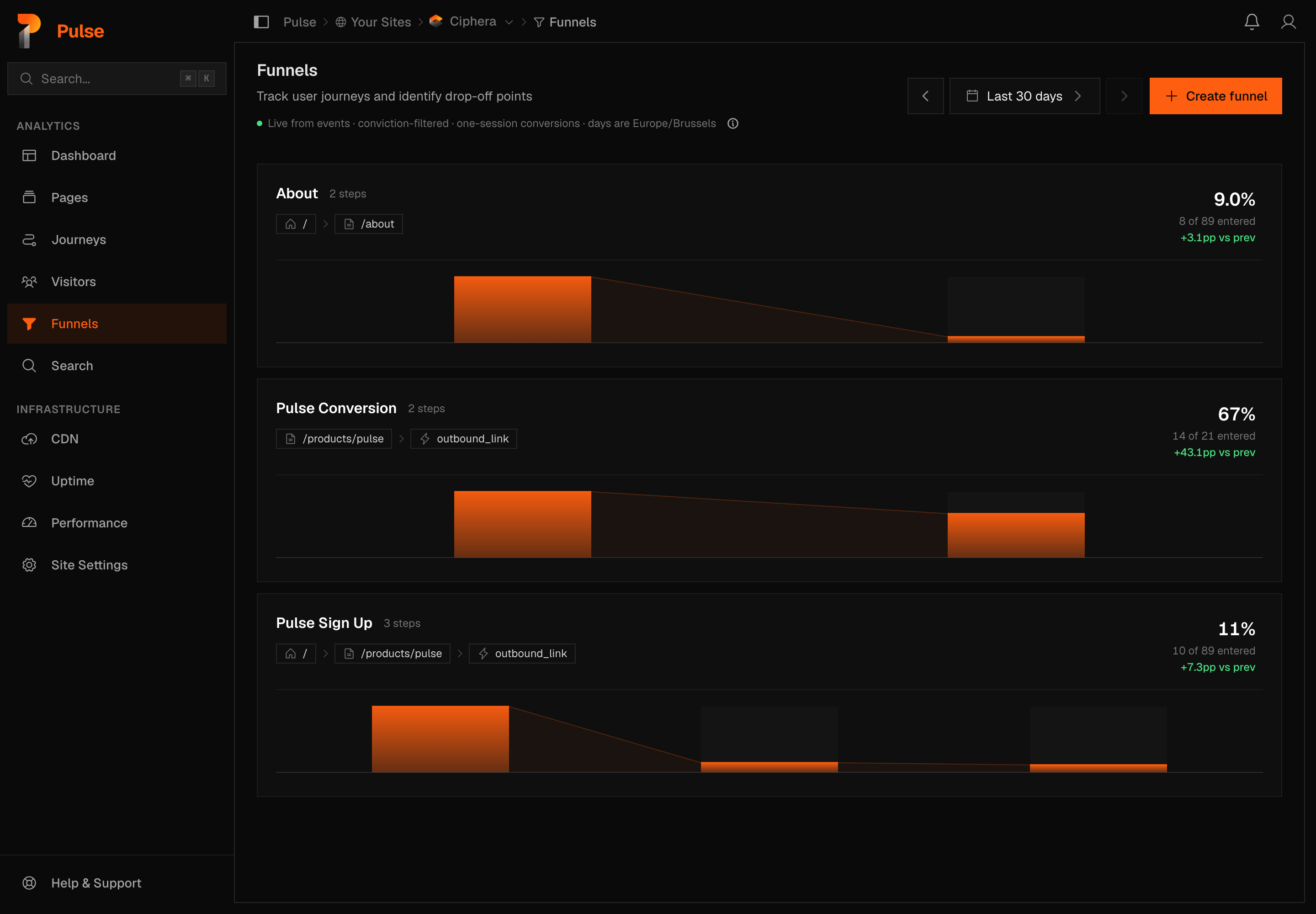
Creating a funnel
Navigate to Sites → your site → Funnels and click Create funnel.
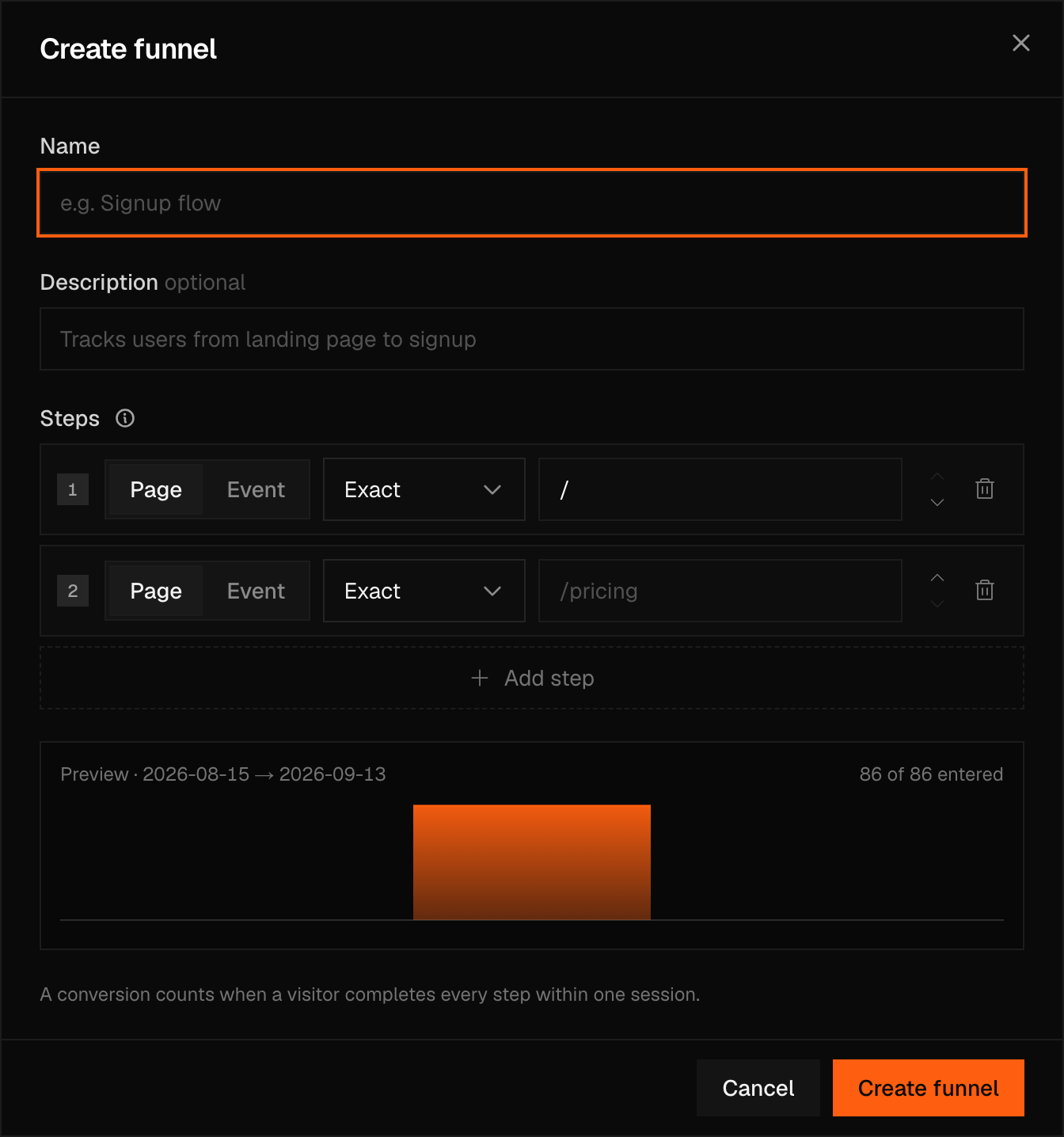
For each step, choose either:
- Page — matches page paths exactly, by substring, or by regular expression
- Event — matches a custom event by name
You can mix page steps and event steps in the same funnel. A funnel needs at least two steps and can have at most eight.
As you add or edit steps, a live preview runs against the page's current date range and shows how many entrants and completions that definition would have produced — so you can see whether a step actually matches real traffic before you save it.
Note
Funnel steps are evaluated in order. A visitor must hit step N before being counted on step N+1. Page reloads within the same session do not double-count.
Funnel report
Opening a funnel shows one panel that carries the headline and the funnel shape together, two panes underneath for drop-off and breakdown, and a daily chart below that — everything reads top to bottom on a single page now, not a chart followed by a table followed by a drawer.
The headline panel
At the top: Conversion, as a share (whole numbers from 10% up, one decimal below that, and an honest 0% rather than a blank), the raw count underneath it (12 of 20 entered), and a change chip, up or down, against the previous period of equal length. When nobody entered in the range, the line says so instead of showing a rate. Where a median time to convert exists, it sits to the right of the same panel.
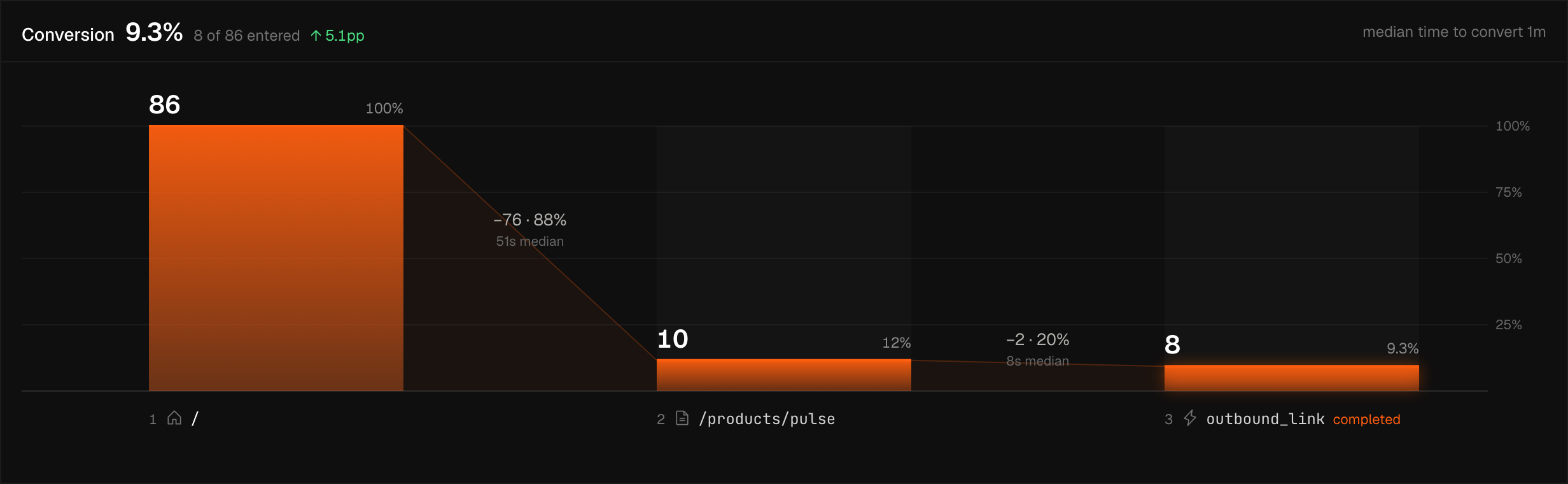
The funnel shape itself sits directly below, in the same panel: one column per step, sized to that step's own count, with the loss between adjacent steps drawn as a wedge in the gap and labelled with its count, its percentage, and the median time to the next step. Click a step, or move between them with the arrow keys, to select it — the funnel opens with whichever step lost the most sessions already selected.
Drop-off and breakdown
Below the columns, two panes sit side by side.
Drop-off is scoped to whichever step is selected: it lists the pages visitors opened after leaving the funnel there, with a link through to Journeys starting from that page. On the final step, or a step nobody dropped from, it says so rather than showing an empty list.
Breakdown is scoped to the whole funnel rather than the selected step — it always compares entered-to-completed conversion end to end, split by one dimension at a time. The dimension menu covers device, browser, OS, country, region, city, language, timezone, screen resolution, referrer, channel, entry page, entry event, and the UTM fields.
Daily
A chart beneath the two panes tracks three things over the range on a shared axis: Conversion as a line, drawn on every day anyone entered and gapped on days nobody did; Entered as a line; and Completed as bars.
Date ranges
Funnels use the same view switcher as every other page — see Time ranges — and your view carries over from the page you came from. Every row is a day or longer, which a funnel needs: a session has to be able to run its course.
Funnels have their own filter control, the same filter builder as the dashboard — but it isn't carried between pages. Clicking through to Funnels from a filtered dashboard opens the funnel unfiltered; a filter set here applies only within Funnels.
Warning
Funnels require the visitor to complete all steps within a single session — one calendar day in your site's timezone. Cross-day funnel tracking is not supported. Note a session is wider than a visit: someone who leaves and returns after 30 minutes starts a new visit but stays in the same session, so their conversion still counts.
What each number means
Funnel step
A step is either a page — matched exactly, by substring, or by regular expression against the path — or an event, matched by name and optionally narrowed by property filters. A step's label defaults to whatever it matches on.
Conversion
The share of entrants — the people who reached step 1 — who got as far as this step, chained through every step in between rather than an independent rate per step. With no entrants in the range, conversion is empty, not 0%.
Drop-off
The share of the previous step's visitors who did not reach this one. When the previous step had no visitors, drop-off is empty rather than 0% — a rate over an empty population is undefined.
Exit pages
The pages visitors opened within an hour of dropping off a step, top ten by volume. Shown for every step except the final one, which has no onward drop-off — the entry step's list is usually the largest, since that is where most visitors leave.
Median time to convert
The median time from entering the funnel to finishing its last step, taken over the sessions that actually converted — a median rather than an average, so a few very slow completions can't drag the headline number up.
Repeated steps
A step can repeat an earlier one, whether that's the same page or the same event, and each occurrence is still matched independently, against a strictly later event than the step before it. A revisit funnel like / → /pricing → / completes its final / step on the return visit, rather than reading zero because the first / step already claimed that match.
Small numbers
Every dimension value is a row in the breakdown, however few entrants it had, so the rows' entrants add up to the funnel's step-1 total unless the dimension has more than 20 values (the breakdown lists the top 20). Until 21 October 2026 a value with fewer than five entrants was left out; that rule has been removed from every part of Pulse.
One-visit conversions
A conversion counts only when every step is completed within a single session — one calendar day in your site's timezone. There is no multi-day conversion window, because session identity resets at your site's midnight and a window control would promise something the data can't keep. A session is deliberately wider than a visit here: stepping away for half an hour starts a new visit but does not break the funnel.
Days are site time
The server cuts each funnel day in the site's own timezone, not UTC and not the viewer's browser timezone, so two people in different countries looking at the same funnel see the same day boundaries.
Live from events, bot-filtered
Funnel numbers are computed from raw events on every request rather than read from a frozen snapshot, and bot and fraud verdicts are applied as part of that computation.
Note
Those verdicts can be revised retroactively, so a funnel's historical numbers can change after the fact. That's the filtering working as intended, not a data fault.