Privacy & Data Collection
What Pulse collects, what it never touches, and the per-site controls available to you.
Pulse is designed to be compliant with privacy regulations by default. The tracking script collects only what is necessary to produce analytics and stores nothing that can identify an individual — no name, no email, no account, and no identifier that survives a calendar month or reaches another website. An optional second script can record interactions as well; it is off unless you add it, and what it does and does not record is set out below.
What Pulse never does
- Sets cookies or uses localStorage to track visitors
- Fingerprints browsers using canvas, WebGL, fonts, or similar techniques
- Stores raw IP addresses
- Collects names, emails, or any personal data
- Tracks visitors across different websites
How visitor identity works
Pulse needs to distinguish visitors without cookies. It does this entirely server-side, using two salted SHA-256 hashes derived from the same inputs and separated by their salt:
session_id = SHA256(daily salt   ‖ domain ‖ IP address ‖ User-Agent)
visitor_id = SHA256(window salt ‖ domain ‖ IP address ‖ User-Agent)- The session salt rotates every day, at midnight in your site's timezone. It is what groups a day's pageviews together.
- The visitor salt rotates on a window you choose per site — see Visitor identity window below. It is what makes a reader who comes back within that window count as one visitor rather than several.
Both are computed at the moment a request arrives and neither can be reversed to recover an IP address. The salt itself isn't specific to your site — what keeps two sites apart is that each one's domain is hashed in alongside it, so the same person browsing two Pulse-tracked sites still produces two unrelated hashes, with no way to connect them.
Raw IP addresses are discarded immediately after the hashes are computed and are never written to disk.
Note
Before 26 August 2026 there was only the daily hash, so "unique visitors" over a multi-day range counted a returning reader once per day. Rows from before that date have no visitor hash and never can — the IP it would be derived from was never stored, so it cannot be backfilled. Treat 26 August 2026 as a boundary when comparing visitor counts across it.
Visitor identity window
Every site starts out recognising a returning reader within the same calendar month — the visitor salt above rotates at the start of the month, in your site's timezone. You can shorten that window, or turn it off, at Settings → Privacy → Visitor identity, in the row labelled Recognise a returning reader for.
| Window | What counts as the same visitor |
|---|---|
| Session only | Nothing beyond the session hash. No visitor hash is written, and identity falls back to the per-day grouping Pulse used before 26 August 2026. |
| 24 hours | A reader who returns within a day. |
| 7 days | A reader who returns within a week. |
| 30 days | A reader who returns within 30 days — a fixed span, not tied to the calendar. |
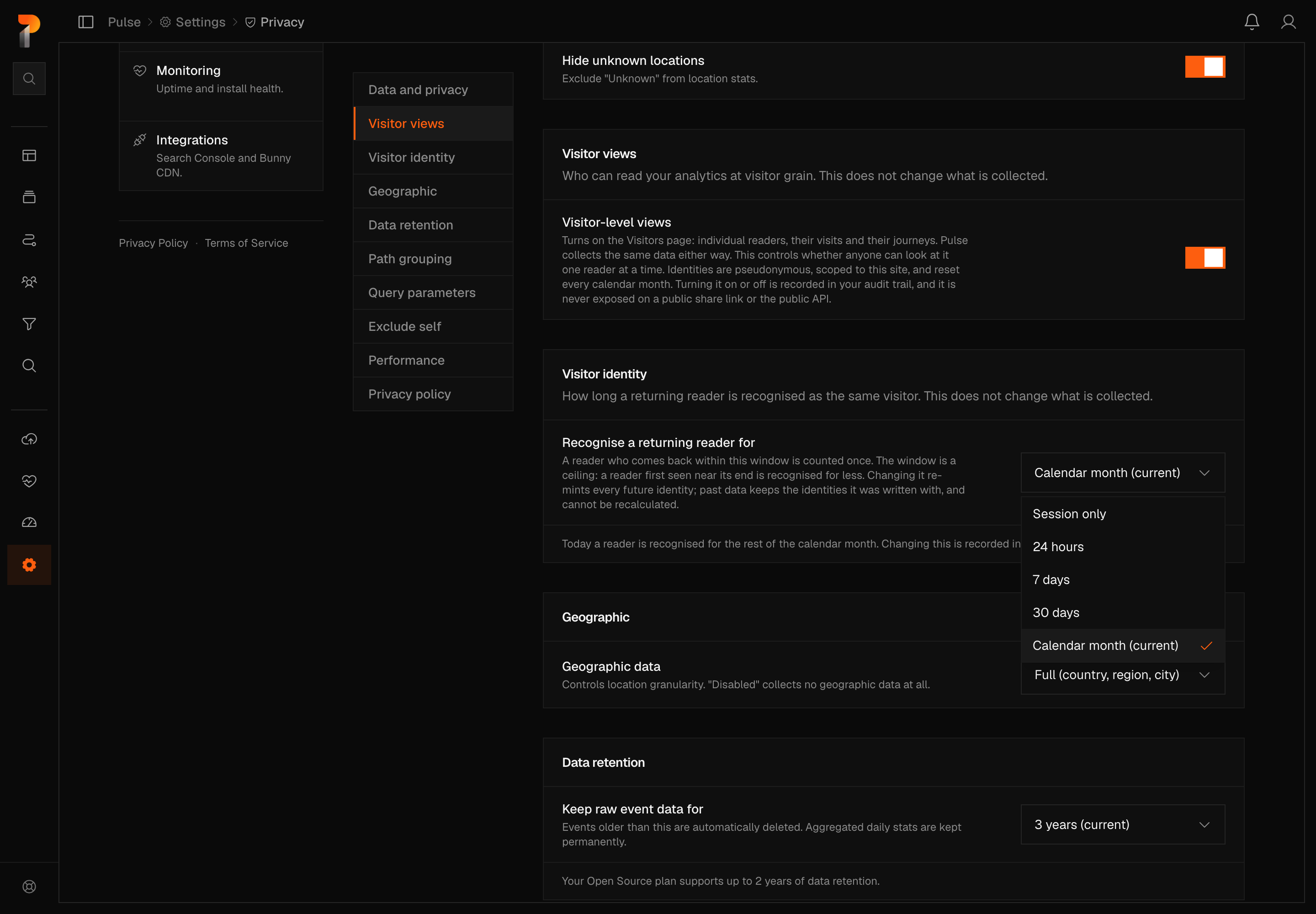
Until you pick one of these, the site keeps the calendar-month rotation it always had. The setting shows that as Calendar month (current), which exists only to describe what is already happening — choose any of the four options above and it drops out of the list for good.
Changing the window reshapes identity going forward only. Visitors already recorded keep the salt that produced them; there is no way to recompute them under a new window. The change is recorded in the audit log as site_identity_window_changed, and, like every other setting on this page, needs an owner or admin to make it.
Visitor-level views
By default, Pulse shows you your traffic in aggregate. A site owner can switch on visitor-level views, which open the Visitors page: the individual readers seen in a range, each visit they made, and — inside a visit — the pages they saw in order, with the events that fired on each page listed beneath it.
A visit's steps read forwards in time, like the month ribbon above them, and can be filtered by kind: pages, outbound clicks, downloads, and your own events always appear, and clicks, copies, and form submits join them once you turn on interaction capture below. Outbound clicks and downloads are described in words — "Left for example.com/pricing", "Downloaded price-list.pdf" — because Pulse records those itself and knows their shape. Your own custom events keep their name and every property, because only you know what they mean.
This does not change what Pulse collects. The same columns are written either way. The switch controls whether anyone can read them one reader at a time.
- Off by default, for every site, including existing ones.
- Turned on per site at Settings → Privacy → Visitor views, by an owner or admin.
- Turning it on or off is recorded in the audit log.
- What it shows is the visitor hash above, under a generated pseudonym. It carries no personal data, cannot be linked to a person, cannot be linked to the same reader on another site, and stops existing when the site's identity window ends — a returning reader comes back as a new visitor under a new name once that happens.
- History begins 26 August 2026. The calendar will not offer earlier days, and a longer range says on its button that it starts there, because earlier rows have no visitor identity.
- Visitor-level data is never exposed on a public share link, in the public read API, in an export, or to Ciphera's internal admin tools.
- It respects your data toggles below: a site collecting country only will not show a city here.
Interaction capture (optional, off unless you add it)
Pulse ships a second, optional script — script.interactions.js — that records
what a visitor did on a page rather than only which page they saw. It is not
part of the standard tag. It is absent from your site unless you deliberately
add its own <script> line, which Settings → Site → General will write for you.
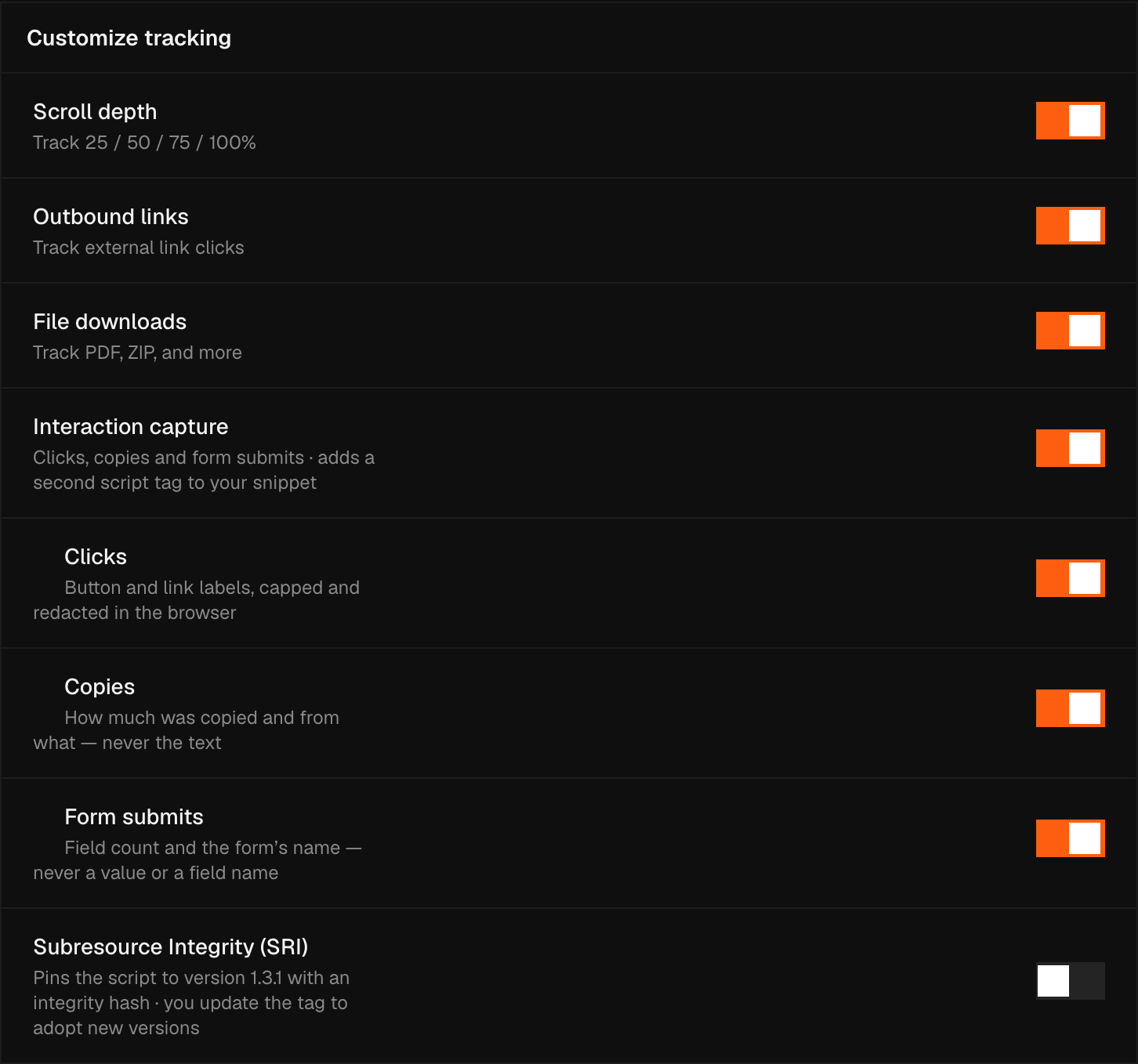
The standard tracking script reads no page content at all. This one reads some, which is why it is separate and why it is off until you ask for it.
What it records
| Recorded | Never recorded | |
|---|---|---|
| Clicks | The visible label of a button or link, shortened to 60 characters | Anything about where it sat on the screen; no CSS selector, no coordinates |
| Copies | How many characters were copied, and the kind of element they came from | 🔴 The copied text itself |
| Form submits | The form's name or id, and how many fields it had | 🔴 Any field's value, and any field's name |
It records nothing you type — no input values, no keystrokes — and it never
reads from an <input>, a <textarea>, a <select> or an editable region.
What it strips before sending
Redaction happens in the visitor's browser, so the raw text never leaves it:
- Email addresses become
[email] - Long digit runs — an order number, a card number — become
[number] - Labels longer than 60 characters are cut short
Turning parts of it off
- Each of the three kinds has its own switch in Settings → Site → General.
- Add
data-pulse-ignoreto any element and nothing inside it is ever recorded — at any depth. Use it on an account menu that prints someone's name, or on a panel showing an order.
Warning
A button's label is text you wrote. Pulse shortens it and strips the patterns
above, but it cannot know that a label is a person's name. If your interface puts
personal data in a control's label, either fix the label or wrap it in
data-pulse-ignore — the same responsibility you already carry for custom event
properties.
Per-site privacy controls
Go to Settings → Privacy to configure what your site collects.
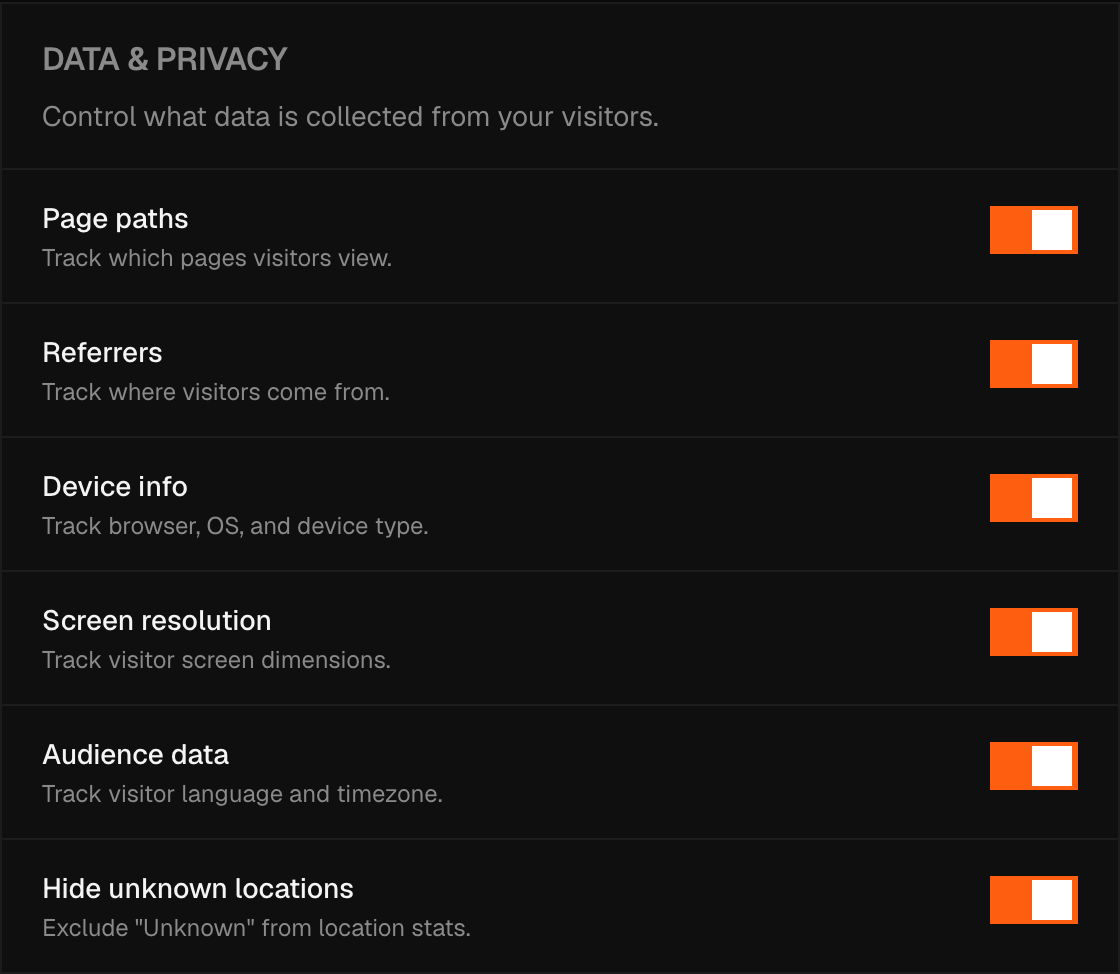
Data toggles
Each dimension can be turned off independently:
- Page paths — the URL path of each pageview
- Referrers — the referring domain
- Device info — browser, OS, and device type
- Screen resolution — viewport dimensions
- Audience data — language and timezone
One switch in the same panel is not like the others. Hide unknown locations changes what you are shown, not what is collected: visits whose location could not be resolved are still recorded, and this simply keeps the "Unknown" row out of your location stats. Turning it on hides nothing from Pulse and nothing from a data-subject request — it tidies a chart.
Geographic granularity
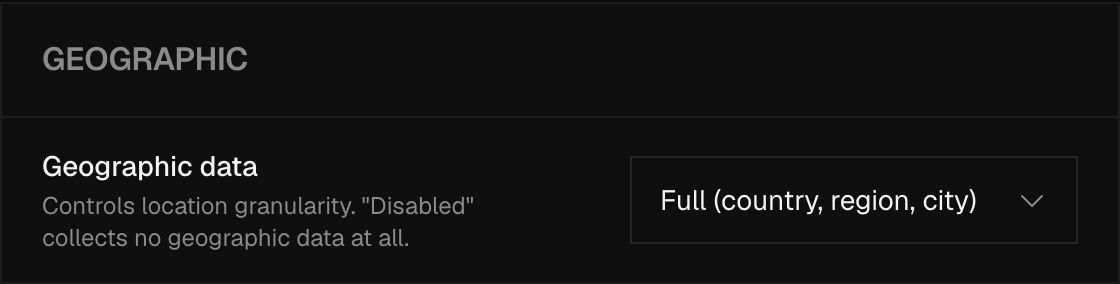
Choose how precisely Pulse records location:
| Setting | What gets stored |
|---|---|
| Full | Country, region, and city |
| Country only | Country only |
| Disabled | No geographic data |
Data retention
How long Pulse keeps individual event records. Options range from 1 month to 2 years, depending on your plan. Aggregated daily statistics (totals, not individual events) are kept permanently regardless of this setting.
Path grouping
Two things decide what shape a page path takes in your stats, and a manual rule always wins over the automatic one.
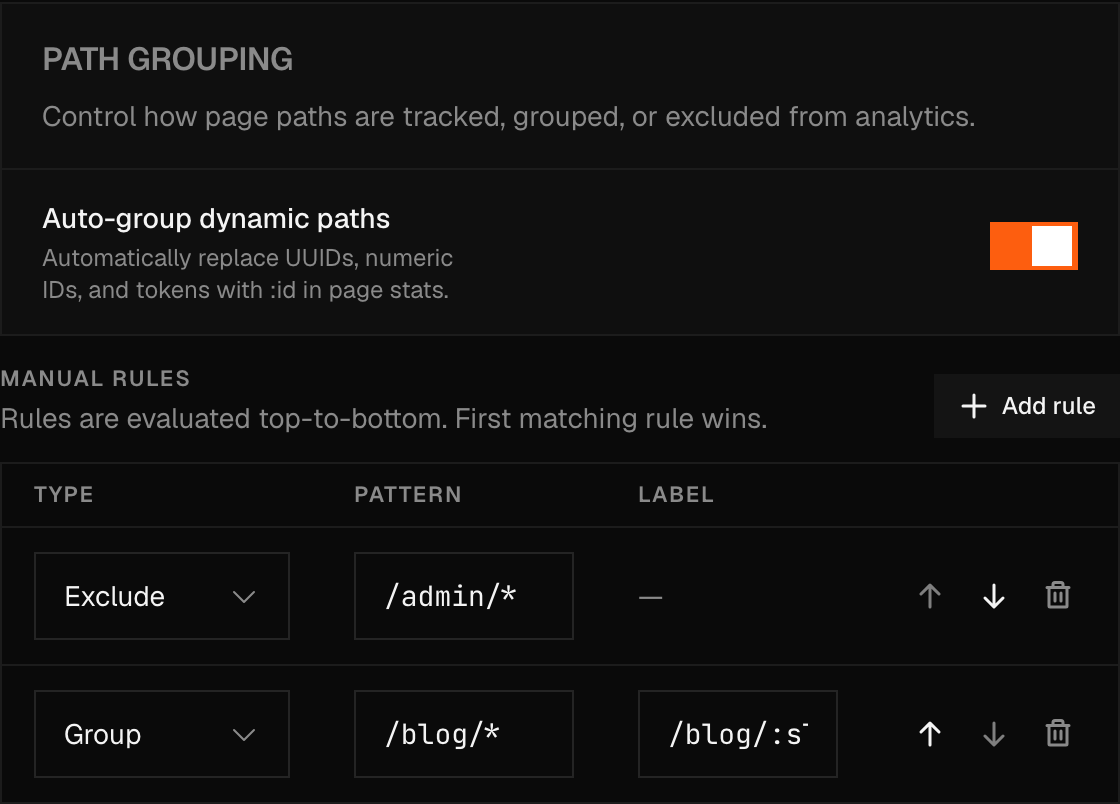
Auto-group dynamic paths is on by default, at Settings → Privacy → Path Grouping. At the moment a pageview lands, if nothing below matches it first, Pulse looks for a UUID in its standard form, a purely numeric id four digits or longer, or a hex token sixteen characters or longer, and replaces that segment with :id — /posts/12345 and /posts/67890 both land in /posts/:id. It deliberately leaves nanoids, base64 tokens, and mixed-letter-and-number slugs alone, because those overlap with real, human-chosen slugs too often to guess at safely.
Manual rules give you the rest of the control — up to 50 per site. Each one has a type, a pattern, and, for Group rules, a label:
| Type | Effect |
|---|---|
| Exclude | Matching paths are dropped from analytics entirely. |
| Group | Matching paths are relabelled under the rule's label, so /sites/9f2a... and /sites/8b71... can both read as /sites/:id. |
A pattern is a glob starting with /, where * matches exactly one path segment and ** matches one or more; a Group rule's label must start with / too. Rules run top to bottom, and the first one that matches wins — manual rules are checked before auto-grouping ever runs, so a Group rule can claim a path that would otherwise have been auto-grouped differently, or left alone.
Saving a change to the rules list or the auto-group toggle doesn't only shape new traffic. Pulse walks your existing events in the background and re-evaluates each one from the original path it keeps for exactly this, so relabelling and exclusion both apply to history too. There's no progress indicator for that pass, so give it a few minutes before checking Top Pages for the result; it only reaches back as far as your site's current retention window.
Warning
Removing an Exclude rule brings back everything it hid — the original path was kept, and un-excluding is just another pass of the same background job. What it can't restore is traffic that arrived while the rule was active: that pageview was never written in the first place, so there's nothing left to bring back.
Excluding a page also stops it from counting against your plan's event quota.
Query parameters
By default Pulse strips every query parameter from a path before storing it. Add names to the allowlist, comma-separated, at Settings → Privacy → Query Parameters, to keep specific ones — /search?q=shoes&session=abc123 becomes /search, or /search?q=shoes once q is on the list.
UTM parameters are the exception: utm_source, utm_medium, utm_campaign, utm_term, and utm_content (with source and ref standing in for utm_source) are always pulled into their own columns, regardless of what's on this list, so campaign attribution doesn't depend on it.
Note
Unlike path grouping and page rules, this list is never applied retroactively, in either direction. Removing a parameter doesn't strip it from paths already stored, and a parameter that was allowed when a pageview arrived isn't kept anywhere once you take it off the list — there's no original copy to fall back to here.
Exclude your own visits
Settings → Privacy → Exclude my visits has a link to your own site with ?pulse-ignore on the end. Open it once and that browser sets a flag in its own localStorage telling the script to stop recording it; open it again to turn tracking back on. The flag is per browser, not per person, so it needs setting again on every browser or device you use — and it's the one place the tracking script touches localStorage at all, to opt a browser out, not to track it.
Browser privacy signals
By default, Pulse respects:
- Do Not Track (
navigator.doNotTrack === "1"or"yes", ornavigator.msDoNotTrack === "1") — no event is sent - Global Privacy Control (
navigator.globalPrivacyControl === true) — no event is sent - WebDriver — automation is detected and excluded
A site owner can switch off Do Not Track or Global Privacy Control for their own site, each on its own, with an attribute on their script tag. See Script Installation. WebDriver exclusion cannot be switched off.
Privacy policy snippet
Settings → Privacy includes a pre-written snippet you can paste into your site's privacy policy. It describes Pulse's data collection in plain language and is kept up to date as the product changes.
Note
If you are subject to GDPR, you do not need a cookie consent banner for Pulse. No cookies are set, and no personal data is processed. Review the generated privacy snippet with your legal team to confirm it covers your specific obligations.
Bot & Spam Filtering
How Pulse's Cerberus engine detects and filters bot traffic out of your analytics, and what the Bot & Spam tab shows you about it.
Account Settings
Your name, sign-in email, password, two-factor authentication, passkeys, sessions, devices, notifications, and how to delete the account.