Dashboard
A tour of the Pulse Analytics dashboard — KPI cards, real-time activity, charts, and all audience panels.
The Pulse dashboard is the main view for your site's analytics. Everything on it responds to the active time range and any filters you have applied.
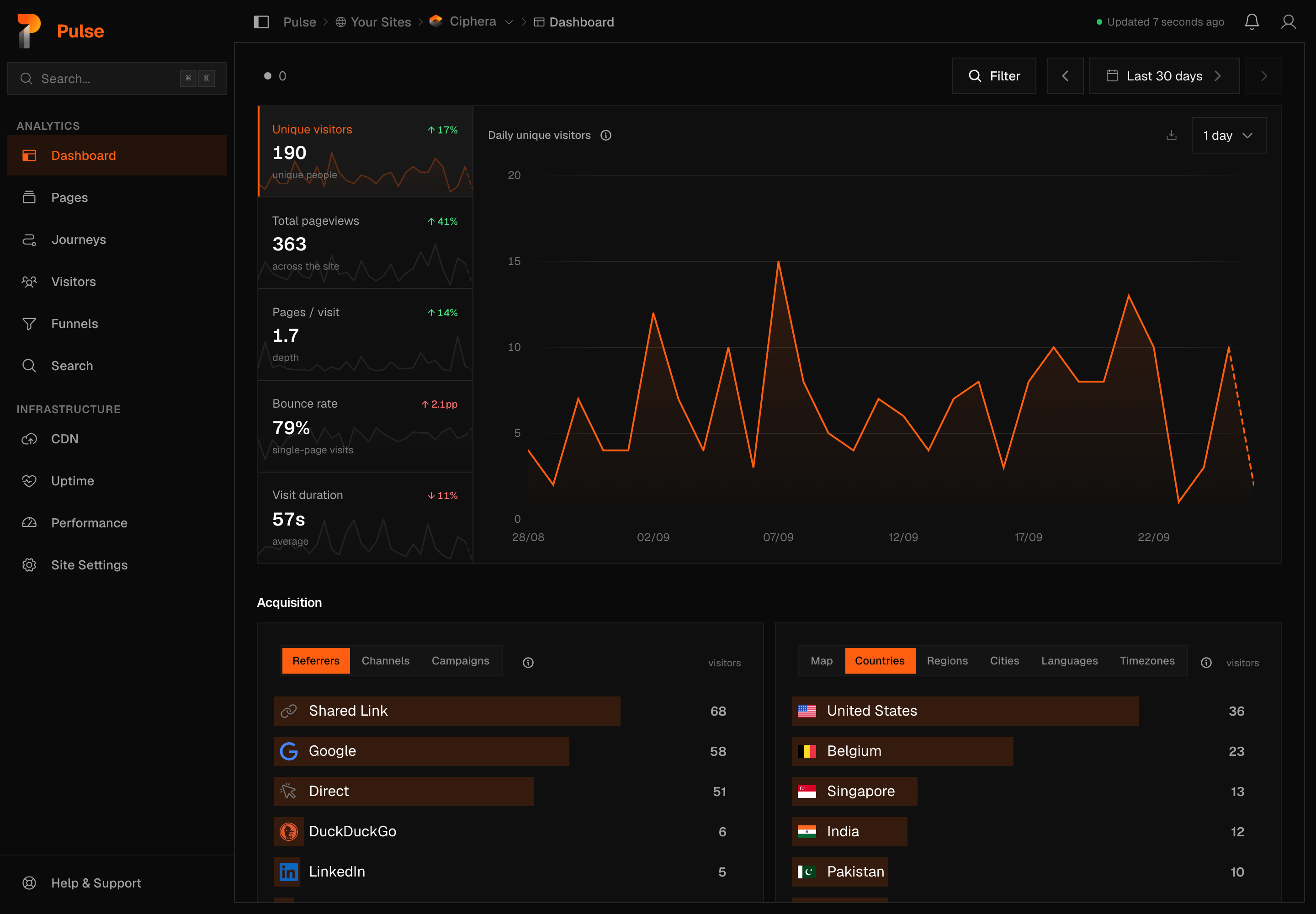
The metric rail
Five metrics sit in a rail beside the chart. Selecting one replots the chart on that metric — the panels below keep their own fixed columns no matter which metric is active.
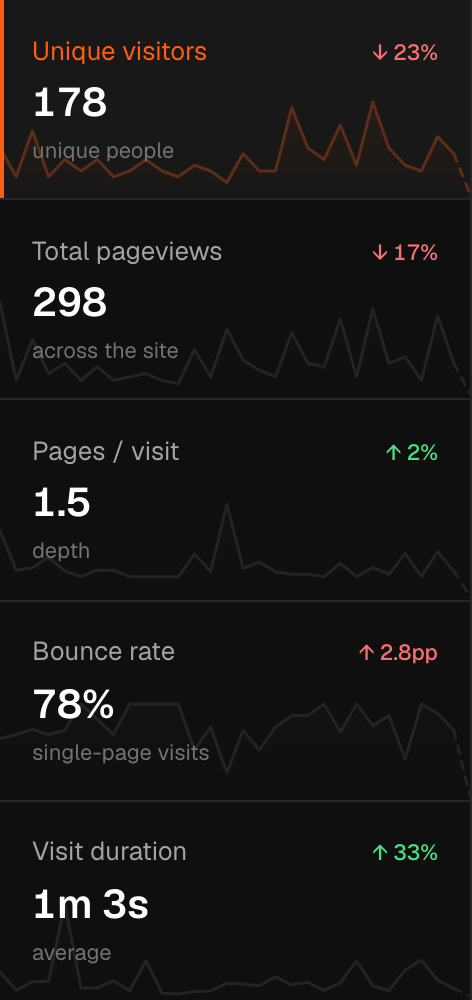
Each row shows a delta against the previous equivalent period. Green means improvement, red decline — bounce rate is inverted, because a lower bounce rate is the better outcome. A metric with nothing to report shows an em dash rather than a zero: an unmeasured value and a measured zero are different answers.
Unique visitors
People, not visits: a returning reader counts once. By default, identity is deduplicated within each calendar month in your site's timezone, so a range that spans months counts a returning reader once per month. That window is a per-site setting — you can shorten it to 24 hours, 7 days or 30, or switch it off entirely, on Settings → Site → Privacy. Before 26 Aug 2026, deduplication was per day — days before that boundary can never be re-deduplicated, because the address the identity derives from is discarded on arrival and never stored.
The daily chart shows each day's unique visitors, so its values can sum to more than the range headline. That is correct, not a discrepancy: the difference is your returning readers.
Total pageviews
Every page a visitor saw in the range that survived bot and exclusion filtering, including repeat loads of the same page by the same visitor.
A page counts when someone sees it. A document that loads in a background tab —
a middle-click, a restored session, a tab that reloaded itself after a deploy —
is counted when it is first brought to the front, not when it loads. In a
single-page app each change of path counts; a link that only changes the query
string or the # fragment is a change of state on the same page, so it does
not. Both rules arrived with tracking script v1.2.0 on 04-09-2026, and both
lower the count on sites that were previously counting those as pageviews.
Pages / visit
Pageviews divided by visits — how many pages someone reads before they stop. A returning reader adds a second visit rather than deepening the first.
Bounce rate
Share of visits that recorded exactly one pageview — a reload counts as a second pageview, so it ends the bounce. A visit ends after 30 minutes of inactivity, so one person can make several visits in a day and each is its own chance to bounce. Deltas are expressed in percentage points, not as a percentage of the previous value.
The panel shows the count behind the rate — "85% — 244 of 286 visits recorded exactly one pageview". That numerator is computed by the server in the same query as the rate, so the two always agree.
Visit duration
Average length of a visit — the time its pages were visible and in use. Unmeasured visits are excluded, not counted as zero.
Time on a page counts only while the page is visible and the visitor is active: the clock pauses while the tab is hidden, and after two minutes without scrolling, clicking or typing. A tab left open on a desk, a laptop that went to sleep, or a background tab that reloaded itself adds nothing. A visit's duration is the sum of its pages' time; a page followed by another page in the same visit never counts more than the gap between them.
A visit carries a duration signal when at least one of its pages sent a timing beacon, or when it had enough pageviews for the gap between them to be measurable. A single pageview with no beacon is unmeasured.
Warning
Counting unmeasured visits as zero-second ones would drag the average down and present the result as a measurement. On one production range it reported 63 seconds where the measured answer was 107.
Note
04-09-2026 is a measurement boundary. Before it, the tracking script reported the wall-clock time since the page loaded, so a tab left open overnight — even on a sleeping computer — counted as visit time; the audit found single pages carrying eight hours. Pages recorded before the boundary are bounded by their visible time and capped at 30 minutes each; pages recorded after it carry the measured active time. Expect the average to step down on most sites, and the number of pageviews on single-page apps to step down too, because a URL rewrite that only changed the query string used to count as a pageview.
Realtime
The live count sits at the far left of the toolbar: a small dot and a number — the people on your site in the last 5 minutes. The dot is orange while somebody is there and grey at zero.
Click it to switch the dashboard into realtime. The chart redraws minute by minute, and the metric rail and every panel describe the same 5 minutes, updating as visitors arrive. A panel with nobody in it says "Nobody on the site in the last 5 minutes." — at this window that is the usual state on most sites, not a fault. Click the count again to return to the view you were on. Realtime is a place you visit, never a view Pulse remembers for you.
The "Updated 6 seconds ago" line in the top bar is something else: when the dashboard last refreshed its numbers.
Time ranges
The view switcher at the right of the toolbar lists the same twelve rows on every page:
- Today, Yesterday
- Last 7 days, Last 30 days, Last 3 months, Last 12 months
- All time — from your site's first day of data to today
- This month, Last month, This year, Last year
- Custom range… — opens a calendar, with an arrow back to the list
The arrows on either side move the range back or forward by its own length. They are off for All time and for realtime.
A row with no data is greyed, with the reason — hover it, or read the line under the list. Last year stays greyed until your site has data from last year. A range that runs past your data says so on the button: "Last 12 months · since 13 Mar" when your data starts inside it, "through 24 Sep" when a page's newest day is earlier than the range's end.
Your view is remembered. Pick a row and every page — on every site — opens on it. A custom range, or one moved with the arrows, follows you until you close the tab. A link somebody shares opens on its own range and does not change yours.
When a page has no data for your view, it shows the closest view that does, and names it on the button: Search Console reports each day about two days late, so Today on the Search page shows "24 Sep · latest day", and Today on Journeys shows "Yesterday · latest day". Your view stays Today.
A custom range can span up to 366 days (480 on the Search page); the calendar stops there. All time has no such limit — past a year the chart uses weekly, then monthly points.
Chart
The chart plots whichever metric is selected in the rail — there's no separate toggle for it. For a range spanning more than a day, a picker beside the chart switches the bucketing between hourly and daily; a single-day range is fixed hourly, and realtime is drawn minute by minute. The chart itself carries no previous-period overlay — that comparison lives in the rail's own delta arrows.
Panels
Below the chart, the dashboard is divided into panels. Each panel is a ranked list; click any row to filter the entire dashboard by that value.
Content
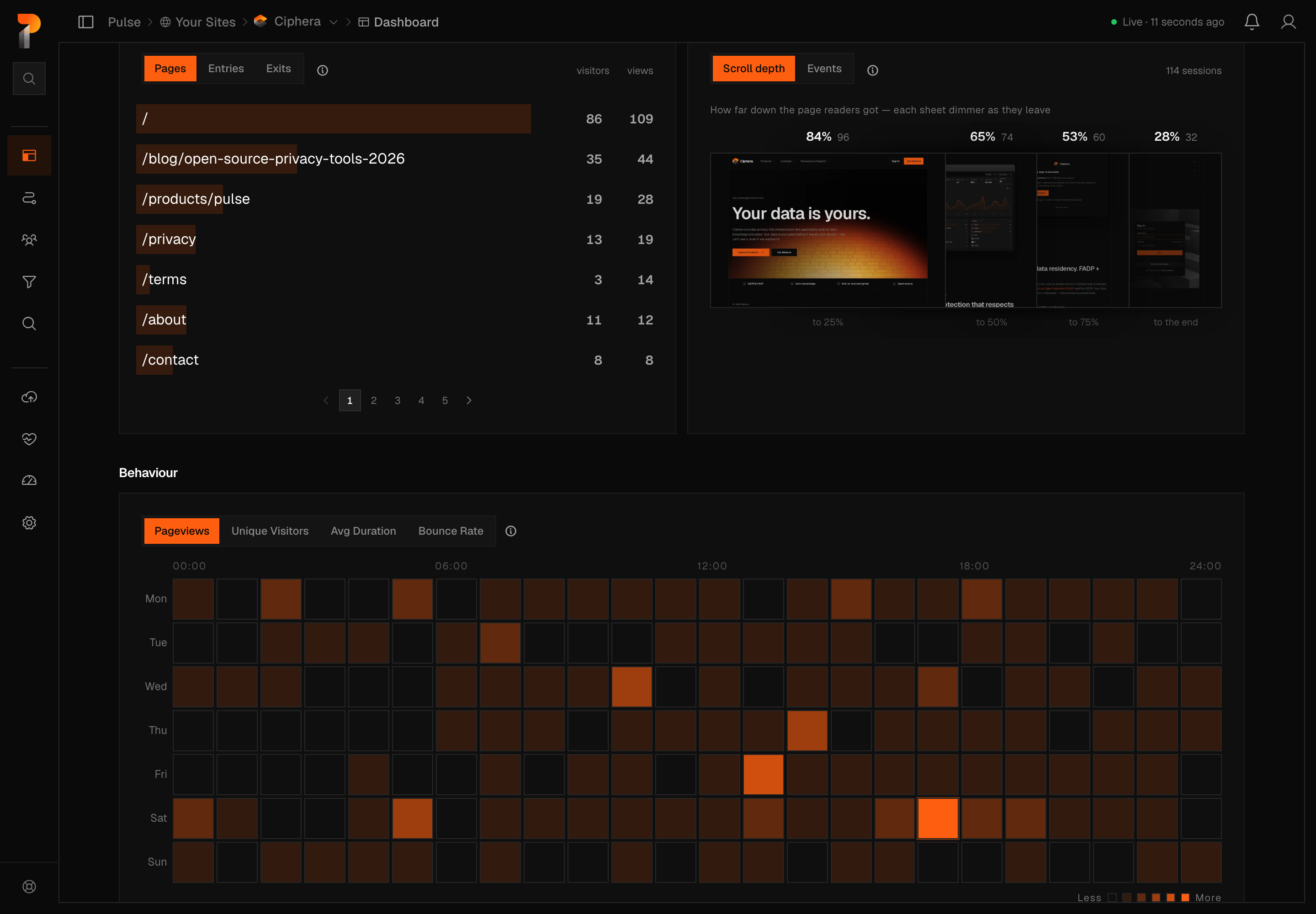
Two cards. One ranks top pages, entry pages, and exit pages by pageview and visitor counts; the other, Content Signals, switches between scroll depth and event counts for the same pages.
Sources
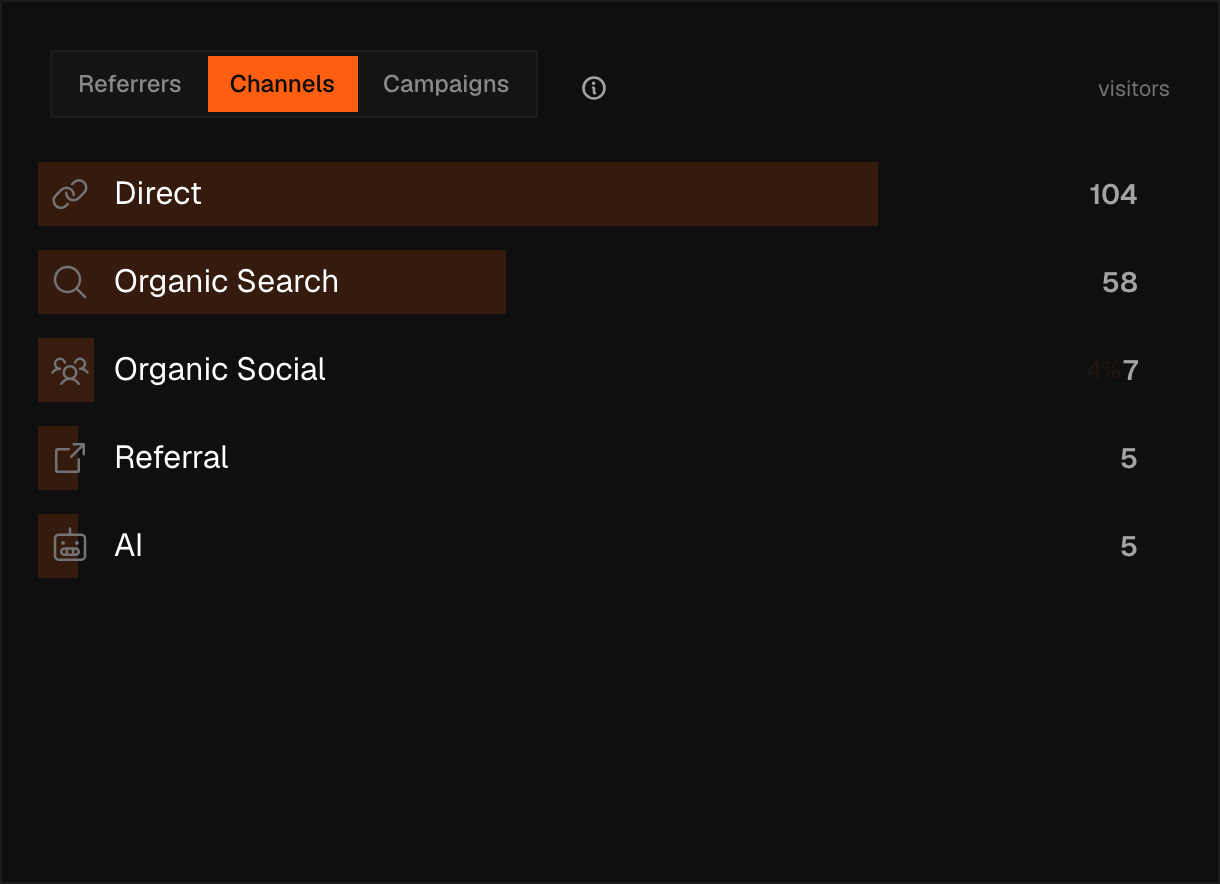
One card, three views: Referrers (domains that sent traffic, with favicons), Channels (the same traffic grouped into buckets like Organic Search, Direct, Social, and Email), and Campaigns (UTM tagging, with a dimension picker for source, medium, campaign, term, and content — see Campaigns for tagging guidance).
Audience
Countries shown with a world map. Sub-tabs: cities, regions, languages, timezones.
Tech
Browsers, operating systems, device types (desktop / mobile / tablet), and screen resolutions.
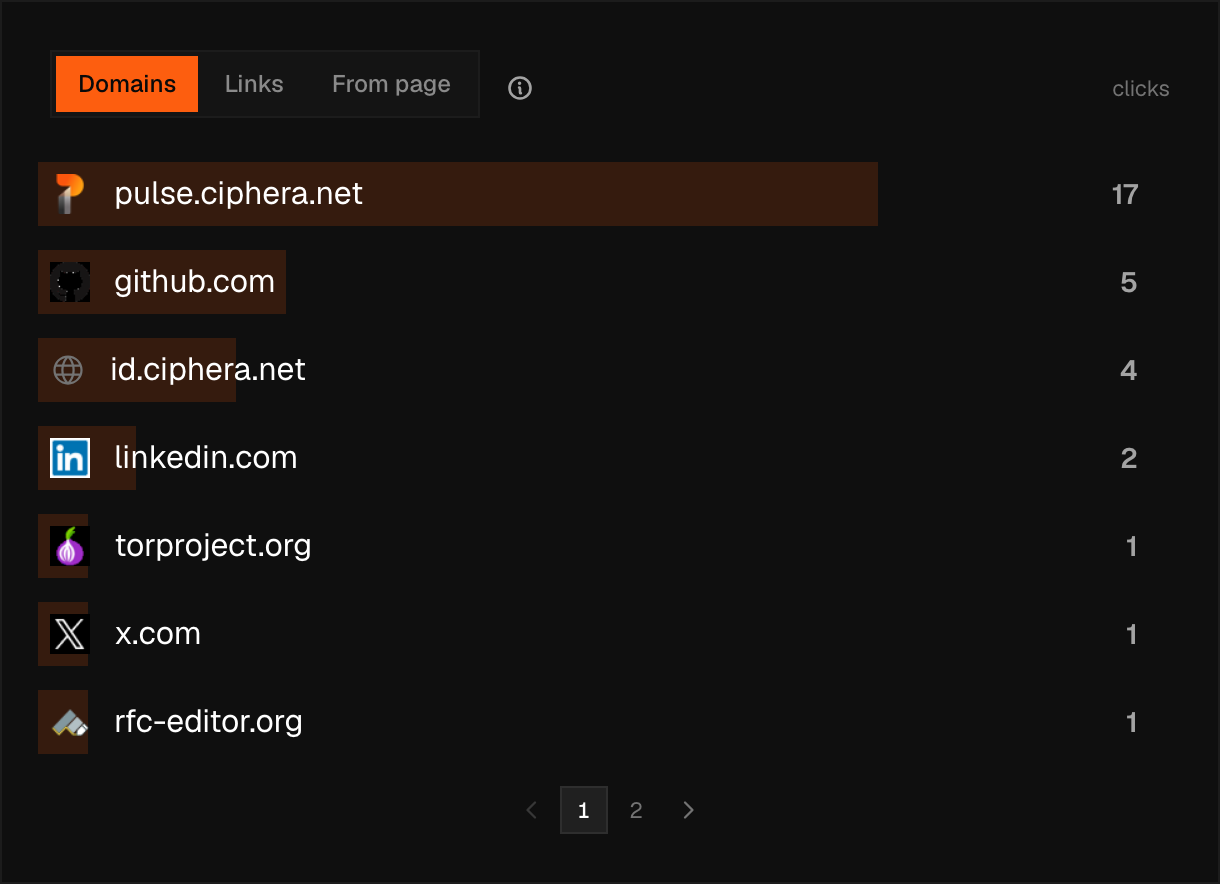
Outbound
Clicks on outbound links, broken down by destination domain, individual link, and the page the click happened from. Nothing to set up — the tracking script records these on its own.
Peak hours
A grid of traffic by day of week (rows) and hour of day (columns), with its own switcher for pageviews, unique visitors, average duration, or bounce rate, and a line under the grid naming the single busiest bucket.
Panel reference
The tour above covers where to find each number. This is what each one actually measures, and where its edge cases are.
Pages
Every page path with at least one pageview in the range, ranked by pageviews. Pageviews count page-load events; visitors count distinct people (deduplicated within the site's identity window, a calendar month unless you have changed it, since 26 Aug 2026), so one person reloading a page adds to pageviews but still counts once as a visitor — and the row's bounce rate and duration are computed over that visitor count, not the pageview count.
A path shown here has already passed through your page rules: a matching Exclude rule keeps it off this list entirely, and a matching Group rule — or auto-grouping, if nothing manual matches first — is why /posts/12345 reads as /posts/:id.
Entries
Each visit's first pageview inside the selected range, grouped by path and ranked by how many visits started there — the landing page, not just any page a visitor happened to view. The query is scoped to the range, so a visit that began before the range shows its first page inside the range as its entry, which may not be where it actually landed.
Exits
Each visit's last pageview inside the selected range, grouped by path and ranked by how many visits ended there. The same range boundary applies as Entries: for a visit still going when the range ends, this is the last page seen inside the window, not the visit's true final page.
Scroll depth
The share of visits that reached at least 25%, 50%, 75%, and 100% down a page. Depth is taken per visit as the deepest point reached across whatever pages it viewed, not per page, and the denominator is visits that produced a scroll reading at all — a visit where scroll was never measured is excluded rather than counted as 0%.
Note
The buckets are cumulative, not exclusive. A visit that reached 80% is counted in the 25, 50, and 75 rows too — read "50% of visits reached 50% depth" as reach, not as a histogram slice.
Referrers
One row per referring domain, ranked by pageviews from that source in the range. Rows sharing a display name are merged — several chatgpt.com URLs collapse into one ChatGPT row — and a merged row's bounce rate and duration are visitors-weighted means of the rows folded into it. A visit's entry referrer sticks for up to 30 minutes, so navigating around your own site afterward does not re-attribute later pageviews. Direct means no referrer was captured and the visitor landed on /; Shared Link means no referrer was captured on any other path — both usually mean a typed URL, a bookmark, or an app that strips the referrer header. Rows with an empty or "Unknown" referrer are dropped from this list.
Channels
The same pageviews sorted into fixed marketing buckets — Direct, Organic Search, Organic Social, Organic Video, AI, Paid Search, Paid Social, Display, Affiliate, Email, SMS, Referral — by a server-side classifier. It reads utm_medium first (cpc/ppc/paid → Paid Search, anything containing "email" → Email) and otherwise matches the referrer's domain against curated lists of search engines, social platforms, video sites, and AI assistants. A referrer that matches no list but isn't empty files as Referral; Direct and Shared Link both fold into Direct. A pageview with neither a recognised medium nor a matching domain shows as Unknown — the classifier does not guess.
Countries
The visitor's country, resolved from the request IP by a GeoIP lookup at ingestion; the IP itself is wiped from the request afterward and never stored on the event. Some rows aren't countries: T1 (Tor network), A1 (anonymous proxy), A2 (satellite provider), O1 (other), EU, and AP each mean the lookup could only place the visitor on an anonymising network or a broad region, not a specific country. Hidden entirely when geographic collection is off in site settings.
Map
The Countries rows plotted geographically — the identical query, including the non-country codes above, drawn rather than listed. It is not a second measurement, so it can never disagree with the Countries tab.
Cities
The finest geography Pulse resolves, from the same GeoIP lookup as Countries. Hidden by the same two gates as Regions: geographic collection off, or geo detail capped at country level.
Regions
The first-level administrative region (state or province) inside the resolved country, from the same GeoIP lookup as Countries. Hidden when geographic collection is off, and hidden separately when the site caps geo detail at country level — country rows keep collecting in that case, regions do not.
Languages
The language the visitor's browser declared in Accept-Language — self-reported by the browser, not derived from the IP, so it reflects a browser setting rather than a location. A country appears in parentheses only when the locale carries a region subtag ("English (United States)"). Gated by the site's audience-data setting, not by the geo-detail setting that hides Regions and Cities.
Timezones
The IANA timezone the visitor's device reported ("Europe/Brussels") — self-reported like Languages, not derived from the IP. The flag next to a row is a best-effort guess from a fixed list of well-known timezone prefixes; it is blank for anything outside that list even though the timezone itself is real. Gated by the same audience-data setting as Languages.
Browsers
Browser name parsed from the user agent at ingestion, one row per browser ranked by pageviews. Hidden when device-info collection is off; pageviews whose browser could not be recognised are dropped from the list rather than shown as "Unknown."
OS
Operating system parsed from the user agent at ingestion, one row per OS ranked by pageviews. Same collection gate and same dropping of unrecognised rows as Browsers.
Devices
Desktop, mobile, or tablet, decided at ingestion from the user agent (mobile/android/iphone → mobile; tablet/ipad → tablet). Same collection gate as Browsers and OS.
Warning
When the user agent says neither, screen width decides — under 768px mobile, under 1024px tablet, wider desktop — so a narrow desktop browser window can be counted as mobile. An iPadOS client hint forces tablet, which the width rule alone would call desktop.
Screens
Screen resolution as reported by the visitor's browser, one row per exact resolution string ranked by pageviews. It has its own site setting — turning off browser/OS/device collection does not turn this off, and the reverse.
Peak hours
A 7-day by 24-hour grid of the selected metric, bucketed by the site's own wall clock rather than the viewer's timezone, so two people in different countries see the same grid. Pageviews and visitors sum across the range; average duration and bounce rate are visitors-weighted, and an hour with no measured value contributes no weight instead of pulling the average toward zero. The "busiest time" line appears only once some bucket carries a real positive value — an unmeasured grid says nothing, rather than naming Monday 00:00 by default.
Events
Custom events sent with pulse.track('event_name'), one row per name, ranked by firings. The number is events, not people — one visitor firing the same event six times reads 6. The distinct-visitor count behind each event exists but is not shown in the row, and no percentage is shown because the events total is not on the wire. Expanding a row loads that event's property keys and the distinct values recorded under each.
Note
Panels load independently. If a panel shows no data, check that the relevant dimension is being sent by your tracking script.